
Found a good succinct article about career progression in programming that I thought I'd re-share:
http://www.aaronlowe.net/archive/2011/10/do-you-want-to-be-the-best/
Year 1 – Focus on Reliability/Standardization
Year 2 – Focus on Optimization
Year 3 – Focus on Automation
Year 4 – Focus on lolcats (ok so Kevin didn’t specifically say lolcats)
Saturday, October 29, 2011

Sunday, October 9, 2011
Is it legal?

After several years not DJing, I decided to get a little DJ mixing console and some software to make some new mixes and play around with making music again. I unpacked my Numark Mixtrack Pro, threw on some Pendulum and Shock One, and started recording. It sounded pretty good. So up it went to Soundcloud. Then I got this email:
It said my mix "...may contain content that is owned or licensed by Warner Music UK (Pendulum, Witchcraft).
As a result, we have paused the upload of your audio for the time being."
Hrm, ok. Maybe it's not going up. But what is legal anyway? At any given time you can find tons of free mixes online, rippable from youtube or from any of 1000 other source on the internet, but I can't post a 20 minute mix on Soundcloud? I found a few good articles, but to summarize it, any webcast or live performance you technically need all the rights from the labels to play their tracks (whether you're being paid or not). Oh well. I guess I just won't go pro with this.
Friday, September 30, 2011
SQL Pivot / Unpivot
In my experience, the PIVOT and UNPIVOT functions in SQL Server are one of those things that you won't ever need until you need them, and then they are invaluable. If you haven't used them, they basically turn columns into rows and vice versa (I'll go into a bit more detail later). Specifically, a pivot turns columns into rows, and rows into columns. Most commonly, these functions are used to present data in a different format for reporting purposes, but there are other applications as well.
There are a few typical examples of usage of pivots, and a good summary can be found in the Books Online for Pivots and Unpivots, but I'll let you read up on that yourself. I'd like to share a real world example of an unpivot usage, and then a tip for navigating the syntax of pivots which I feel make them way easier.
For a procedure I was writing recently, I had a table which looked like this:

The idea is that for the [ctnull] column, you want to have the count of how many columns are not null for the purpose of averaging the fields you actually have data for (i.e. isnull(val1, 0) + isnull(val2, 0) + isnull(val3, 0) + isnull(val4, 0) / ctnull).
This is doable with some ugly case statments and a few other methods, but as soon as it evolves beyond a basic calculation, this gets really hairy really fast, and thus is a perfect application for a pivot (or more specifically in this case, an unpivot to make an individual row for each date and measure:
TheDate Measure value
40000 Val1 87
40000 Val2 21
40000 Val3 33
40000 Val4 null
40001 Val1 82
...
PIVOT SYNTAX
The syntax for these operations can be the most confusing, but I realize that there are 3 basic components to a pivot, each with a specific purpose, and when properly understood make them much more manageable. You have an outer query, a subquery, and the pivot. The below example is from BOL:
--Part 1
SELECT VendorID, Employee, Orders
FROM
--Part 2
(SELECT VendorID, Emp1, Emp2, Emp3, Emp4, Emp5
FROM pvt) p
UNPIVOT
--Part 3
(Orders FOR Employee IN
(Emp1, Emp2, Emp3, Emp4, Emp5)
)AS unpvt;
GO
Part 1: This defines the aesthetic structure of the result table. In other words, if you want your outputs first column to be employeeId, put that there. If you want subsequent columns along the top to be ice cream flavors, put those across the top. This is mostly responsible for naming and organizing what you want the output to look like. You can use aggregate functions, case statements, or just about anything else you want.
Part 2: This is the actual data and source for the data you want for your pivot. If you want a value to be output or used, it must be in this select. So this would contain your EmployeeIDs, their sales figures, height, weight, ice cream preference, or whatever else you will be using or pivoting on.
Part 3: This contains the actual pivot syntax. While there is still some cryptic syntax in here, once you have realized that this 3rd part is really the only unfamiliar part to the pivot, its much more manageable. You just need the column you want to pivot on, the aggregates, and the IN statement for the valid columns/rows. Spend a little time familiarizing yourself with this portion as it turns out it's really the only non-standard portion.
Once you realize what the function of the first two parts are and how to construct them, it breaks down the big ugly pivot syntax into three familiar and easy to deal with chunks which make the whole thing much more friendly. Hope this helps!
There are a few typical examples of usage of pivots, and a good summary can be found in the Books Online for Pivots and Unpivots, but I'll let you read up on that yourself. I'd like to share a real world example of an unpivot usage, and then a tip for navigating the syntax of pivots which I feel make them way easier.
For a procedure I was writing recently, I had a table which looked like this:

The idea is that for the [ctnull] column, you want to have the count of how many columns are not null for the purpose of averaging the fields you actually have data for (i.e. isnull(val1, 0) + isnull(val2, 0) + isnull(val3, 0) + isnull(val4, 0) / ctnull).
This is doable with some ugly case statments and a few other methods, but as soon as it evolves beyond a basic calculation, this gets really hairy really fast, and thus is a perfect application for a pivot (or more specifically in this case, an unpivot to make an individual row for each date and measure:
TheDate Measure value
40000 Val1 87
40000 Val2 21
40000 Val3 33
40000 Val4 null
40001 Val1 82
...
PIVOT SYNTAX
The syntax for these operations can be the most confusing, but I realize that there are 3 basic components to a pivot, each with a specific purpose, and when properly understood make them much more manageable. You have an outer query, a subquery, and the pivot. The below example is from BOL:
--Part 1
SELECT VendorID, Employee, Orders
FROM
--Part 2
(SELECT VendorID, Emp1, Emp2, Emp3, Emp4, Emp5
FROM pvt) p
UNPIVOT
--Part 3
(Orders FOR Employee IN
(Emp1, Emp2, Emp3, Emp4, Emp5)
)AS unpvt;
GO
Part 1: This defines the aesthetic structure of the result table. In other words, if you want your outputs first column to be employeeId, put that there. If you want subsequent columns along the top to be ice cream flavors, put those across the top. This is mostly responsible for naming and organizing what you want the output to look like. You can use aggregate functions, case statements, or just about anything else you want.
Part 2: This is the actual data and source for the data you want for your pivot. If you want a value to be output or used, it must be in this select. So this would contain your EmployeeIDs, their sales figures, height, weight, ice cream preference, or whatever else you will be using or pivoting on.
Part 3: This contains the actual pivot syntax. While there is still some cryptic syntax in here, once you have realized that this 3rd part is really the only unfamiliar part to the pivot, its much more manageable. You just need the column you want to pivot on, the aggregates, and the IN statement for the valid columns/rows. Spend a little time familiarizing yourself with this portion as it turns out it's really the only non-standard portion.
Once you realize what the function of the first two parts are and how to construct them, it breaks down the big ugly pivot syntax into three familiar and easy to deal with chunks which make the whole thing much more friendly. Hope this helps!
Wednesday, September 14, 2011
Yellow Fruit
King Soopers usually has a selection of weird fruits and every now and then I pick a random one up, perform an autopsy on it, and generally eat it. This is the story of a big leathery yellow thing.

It's about 7 inches in diameter, bumpy leathery surface and weights about three pounds. The outside skin is rugged and takes a little extra knife pressure to puncture, but once you're in, you can slice through it like butter.

Once open, the first impression is that of a cantelopue, mixed with a watermelon.


After removing the seeds, you can really see how juicy and soft the fruit is.


I sliced it up like I would a canteloupe and ate a few pieces plain. It's a very soft fruit, with a texture almost like a banana. As with the smell, it has a mildly sweet taste like the melon combination I mentioned above.

I opted to make a smoothie with it, and added frozen strawberries to the mix. I don't have a picture of the final smoothie because at the time of writing this, I drank it, and the pics I took were all blurry. The smoothie turned out awesome. Next time I think I'll throw some kiwi in the mix.


It's about 7 inches in diameter, bumpy leathery surface and weights about three pounds. The outside skin is rugged and takes a little extra knife pressure to puncture, but once you're in, you can slice through it like butter.

Once open, the first impression is that of a cantelopue, mixed with a watermelon.


After removing the seeds, you can really see how juicy and soft the fruit is.


I sliced it up like I would a canteloupe and ate a few pieces plain. It's a very soft fruit, with a texture almost like a banana. As with the smell, it has a mildly sweet taste like the melon combination I mentioned above.

I opted to make a smoothie with it, and added frozen strawberries to the mix. I don't have a picture of the final smoothie because at the time of writing this, I drank it, and the pics I took were all blurry. The smoothie turned out awesome. Next time I think I'll throw some kiwi in the mix.


Follow your dreams and stuff
Well, I've been programming SQL Server now for the eons that is 4 months, and I gotta say, I've never been happier in my life. For a while after college, I sort of had a fear that I would end up doing something like recruiting for the rest of my life, grinding my teeth through each agonizing second of something I didn't love. Honestly, I got to the point that I was so frightened by the possibility of not loving what I did, that I started really exploring what it was that I wanted to do.
It turns out it had absolutely nothing to do with my degree. I know this is hardly news to the world at large, but apparently school doesn't dictate what you do with your life (or maybe it does, just in that it steers you away from what you went to school for...).
The point is, I took it upon myself to pick up books, subscribe to training websites, write programs and databases, come up with projects and most importantly, actually apply for jobs. It can be easy to feel trapped in a certain flow of life, but it's refreshing to know that hard work and dedication can actually pay off.
It turns out it had absolutely nothing to do with my degree. I know this is hardly news to the world at large, but apparently school doesn't dictate what you do with your life (or maybe it does, just in that it steers you away from what you went to school for...).
The point is, I took it upon myself to pick up books, subscribe to training websites, write programs and databases, come up with projects and most importantly, actually apply for jobs. It can be easy to feel trapped in a certain flow of life, but it's refreshing to know that hard work and dedication can actually pay off.
Friday, September 9, 2011
SQL Avoiding Subquery Using OVER()
I came across a cool way to avoid using subqueries when you need to get different aggregates in the same result set. Typically, you use a subquery with the aggregate you want, and then select that value for the other aggregates you want to work with. While this doesn't really cause any problems, sometimes it clutters up the code, and as it turns out, can be slightly more costly than other methods.
The code below shows what I mean. I have an example of how you might think to go about doing it, which doesn't work, a method that utilizes a subquery, and a nifty trick you can do using an over() clause with the aggregates.
Scenario: we want to see what percent of the time a given value occurs in a set. To do this, we want to divide the count of each value by the count of total values. In the above test data, 1 occurs 50% of the time (2/4) whereas 2 and 5 occur 25% of the time (1/4, 1/4). This is a pretty simple scenario to solve, but there are a few ways to go about doing it. Pay special attention to the [TotalCount] column (aka the denominator of the [Percent] column.
The over() clause allows you to apply the aggregate over a different window as you see fit, which in this case ends up being over the entire set. The end result is the same but with much less code, and faster.

The relative cost of the subquery method is 59% compared to 41% using the over() clause, which is pretty significant. Toy around with the over() clause and using different aggregate functions. This primarily works because you have to hit #test once for the overall query, and again for the subquery. The method with the over() clause only hits the #test table once, and most of the cost comes from a sort performed by the over(). You can generate some useful figures to work with without having to really delve into any subqueries.
The code below shows what I mean. I have an example of how you might think to go about doing it, which doesn't work, a method that utilizes a subquery, and a nifty trick you can do using an over() clause with the aggregates.
if OBJECT_ID('tempdb.dbo.#test') > 0 drop table #test
create table #test
(
 value int
)

insert into #test (value)
SELECT 1
union all
SELECT 1
union all
SELECT 2
union all
SELECT 5

SELECT * FROM #test
Scenario: we want to see what percent of the time a given value occurs in a set. To do this, we want to divide the count of each value by the count of total values. In the above test data, 1 occurs 50% of the time (2/4) whereas 2 and 5 occur 25% of the time (1/4, 1/4). This is a pretty simple scenario to solve, but there are a few ways to go about doing it. Pay special attention to the [TotalCount] column (aka the denominator of the [Percent] column.
--This query is in valid because the aggregates aren't part of the GROUP BY
SELECT
 [Count] = COUNT(1),
 [TotalCount] = SUM(COUNT(1)),
 [Percent] = COUNT(1) * 100.0 / SUM(COUNT(1))
FROM #test
GROUP BY value

--Subquery option
--This is the way I initially thought of doing it
SELECT
 [Count] = COUNT(1),
 [TotalCount] = (SELECT COUNT(1) FROM #test),
 [Percent] = COUNT(1) * 100.0 / (SELECT COUNT(1) FROM #test)
FROM #test
GROUP BY value

--OVER() option
--This is the cool way that I saw a co-worker do today
--by using an empty OVER() statement, you can avoid using the subquery and actually save some performance costs
SELECT
 [Count] = COUNT(1),
 [TotalCount] = SUM(count(1)) OVER(),
 [Percent] = COUNT(1) * 100.0 / SUM(COUNT(1)) OVER()
FROM #test
GROUP BY value
The over() clause allows you to apply the aggregate over a different window as you see fit, which in this case ends up being over the entire set. The end result is the same but with much less code, and faster.

The relative cost of the subquery method is 59% compared to 41% using the over() clause, which is pretty significant. Toy around with the over() clause and using different aggregate functions. This primarily works because you have to hit #test once for the overall query, and again for the subquery. The method with the over() clause only hits the #test table once, and most of the cost comes from a sort performed by the over(). You can generate some useful figures to work with without having to really delve into any subqueries.
Thursday, September 8, 2011
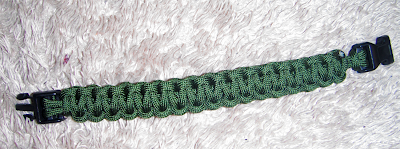
Paracord Bracelet
How many times has this happened to you? You've got some big heavy thing you need to tie to something else, but you just don't have any high tensile strength woven fiber? Well no more! I bought 100 yards of paracord and some plastic clasps to make paracord bracelets! Here's my first one.



Subscribe to:
Posts (Atom)
